Making of words.zip
After making monkeys.zip (Infinite Monkeys typing Shakespeare) - I followed it up with an Infinite Word Search game - words.zip. Anyone can hop on and immediately find words on an infinite canvas - exploring the endless void or collaborating with others to make art and phallic imagery to their hearts content.
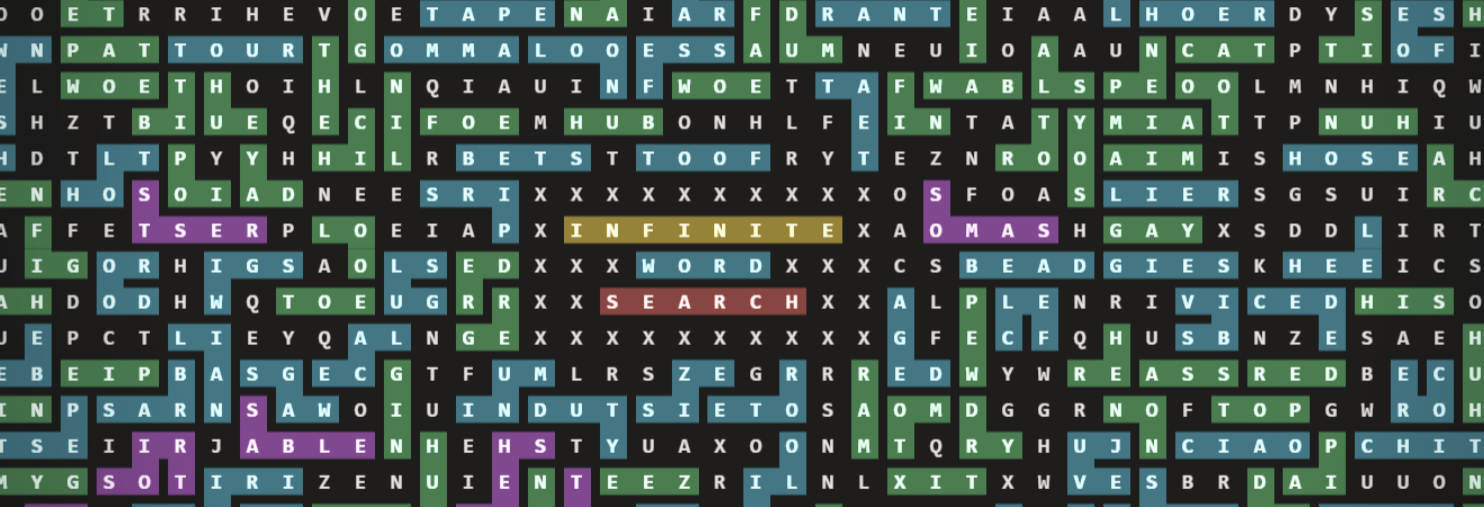
On the surface, these sites have a number of thematic similarities - an infinite canvas, an attempt to extract meaning from the noise, an inadvisable .zip domain. This time though, the primate behind the keyboard is yourself! Now that it’s been out for a few months, I figured it’s time for a fun little tech write-up on what makes it possible.
The Stack
The site is statically hosted, with a backend based around Firebase with a handful of Cloud Functions. We’ll get into some of the details later - but this is a departure from monkeys.zip which has a postgres (Supabase) backend. I’m very familiar with Firebase, and if you know how to work around its limitations (limited QPS per document, limited document size, can get expensive at scale) - the benefits are still really really compelling (real-time subscribing, super fast queries, easy web UI with local emulation).
Letter Generation
One decision that informs the rest of the design is that words.zip does not work like a traditional word search at all. It does not store all the letters in some giant board somewhere - nor does it store all the valid locations of words that could be found. In an effort to reduce bandwidth, storage costs, complexity, and client latency, the grid is procedurally generated from a single seed. This allows a client to navigate the map even when entirely offline.
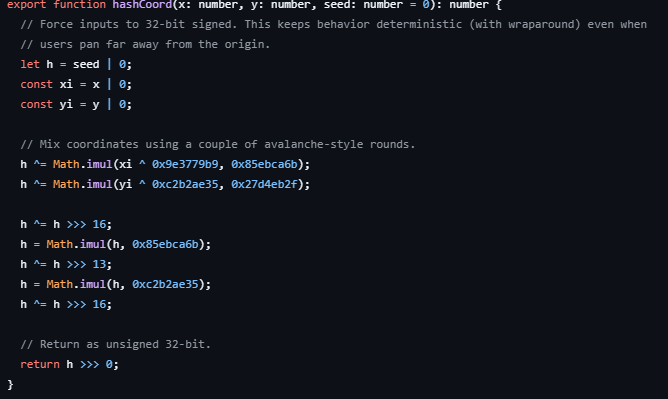
When the app needs the letter at a location, it hashes the coordinates with a modified MurMurHash and uses the result to pick a letter (weighted towards common English letters). This process is very efficient, and allows us to generate all the letters user scrolls to extremely quickly, even when zoomed far out.
Dictionary
Another early optimization is the dictionary of valid words. I chose this repo because it was the first one I found and I didn’t really put much more thought into it. However, I did pull out all words smaller than 3 letters and all words longer than 12. When gzipped it sits under 607kB, which isn’t nothing, but it’s certainly not breaking our bandwidth budget. It is of course easily cached and almost never changes. I added the planets to it, since I wanted to make that one of the hidden achievements.
Word Submissions and Storage
While the letters and dictionary are relatively low-lift in terms of server-client interaction, we do need to keep track of words which have been entered. For this we utilize Firestore, which also provides the realtime collaboration aspects. When a player finds a valid word, they can press a button to call our submitWord function. This function simply checks that the input is indeed a valid word, and doesn’t intersect with existing words - then puts the word into a bucket.
The found words are chunked into bucket documents that are 128 x 128 letters in size. Each stored word belongs to the tile containing its starting cell, which keeps reads and realtime subscriptions local to the area a player is currently viewing. This vastly reduces Firestore reads, which are per-document rather than bandwidth-metered, and results in a better experience either way.
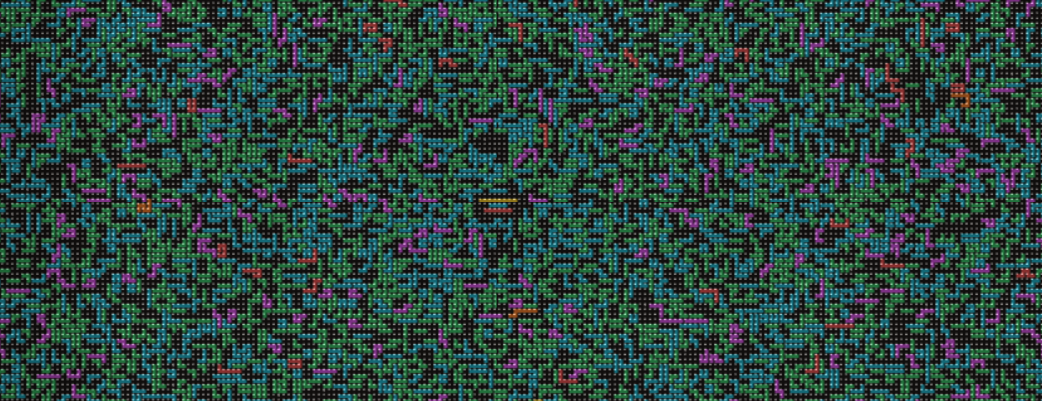
Loading the densely packed origin would result in several thousand firestore reads per user if a naive each-word-is-a-document approach was taken. Instead, it just loads 4 to 8 “chunk” documents. The encoding inside each chunk is also optimized to be compact. A word is stored as:
- a starting position within the tile
- a simple integer array of directions
- the word itself is irrelevant
So rather than saving every coordinate in a path like [[10, 4], [11,4], [12,4], [12,5]] - we instead encode direction, rather than coordinates - as in “[3, 3, 1]” (down, down, right). This seemingly tiny change will reduce the size of chunk payloads by around 35%. Chunks aren’t a bandwidth sink in the scheme of things - but this encoding also becomes relevant in frontend performance, since when rendering our highlights, we can reuse “shapes” of highlighted words, rather than building the path each time.
Rendering performance
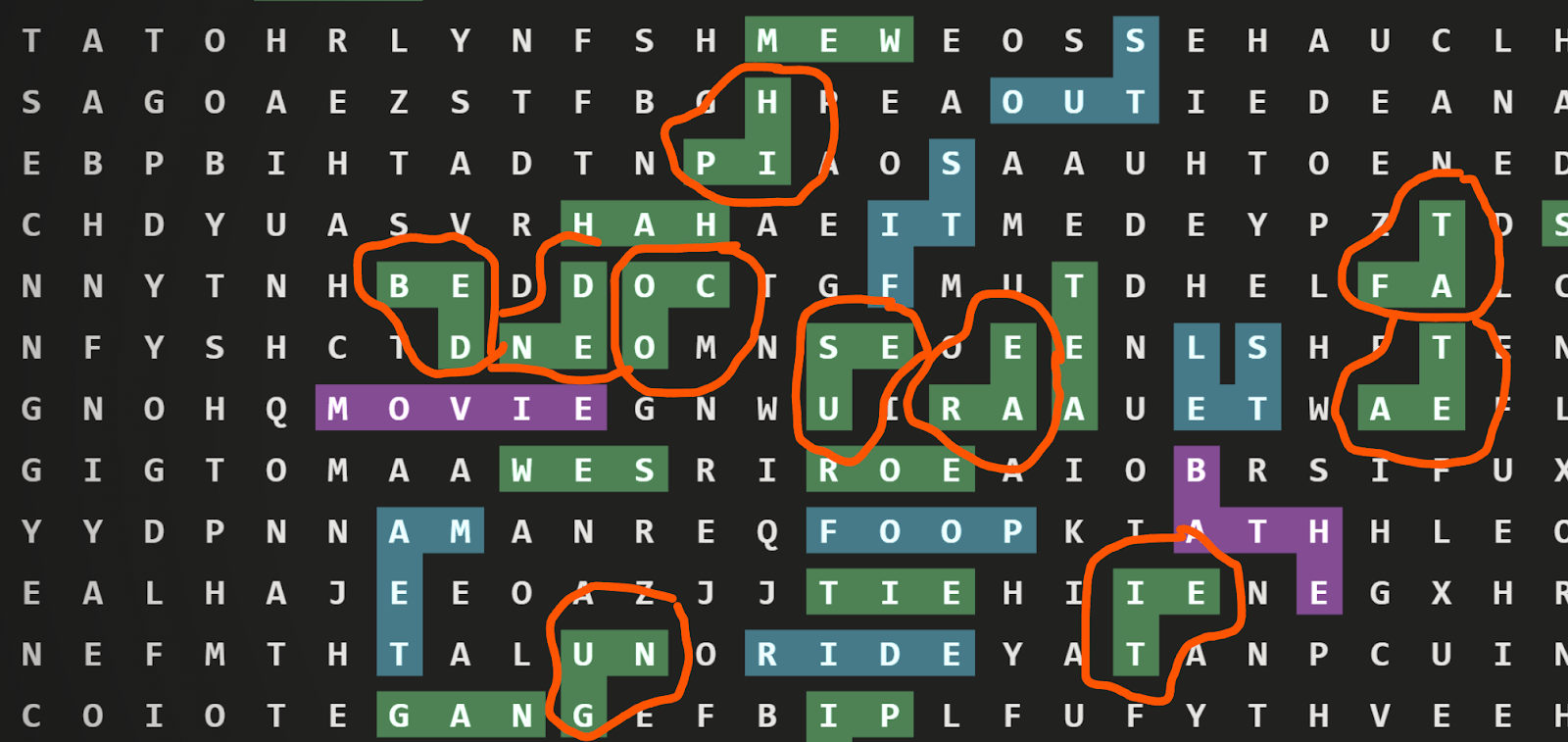
In the above example, all the circled words can use a drawImage with the same source, because the path is the same. When rendering 1000s of highlighted words on the screen, every bit of caching helps. You’ll notice that the “shape” is rotated - our earlier encoding allows us to really easily map word ‘paths’ even to rotated ones - when searching our dictionary of “shapes” - normalize the first value to ‘1’ to account for rotations. EG [3,3,1] becomes [1,1,3] in our dictionary - with each integer just referring to a 90 degree clockwise rotation.
Back to letters - similarly to how the backend groups words into chunks, the frontend will abstract the board into chunks too. These chunks have multiple scales and resolutions, which is how Google Maps, Leaflet, and plenty of other zoomable interfaces work as well. Using a preexisting library was eschewed in favor of a custom-built (slop coded) design, for the weird needs of an infinite collaborative word search. At the furthest zoom, on some devices you can see over one million letters at once!
Instead of repainting every visible letter from scratch every frame, the app pre-renders bitmap chunks and then reuses those bitmaps while you pan. The level of zoom informs the size of these chunks. In the current implementation, that ranges from tiny close-up chunks of 8 cells with high-fidelity sprites, all the way out to 256-cell chunks at low zoom. The sprite sizes scale similarly, from detailed 128x128 pixel characters down to an unreadable but accurate 3x3 pixel per character. Past that level of zoom, we just render random noise, and it’s almost impossible to tell it’s different from the real characters. Sue me!
Web Worker + OffscreenCanvas
One of the biggest performance gains came from leaning hard on `OffscreenCanvas`, especially inside a Web Worker.
As mentioned, we render chunks at once, so they can be cached and reused while you pan or zoom. In earlier versions - all of that chunk generation would compete directly with input handling and the visible canvas on the main thread. Meaning that panning would stutter and the whole experience would feel sticky.
Migrating to using OffscreenCanvas in a WebWorker vastly improved the feel of the app. A worker receives a request to render a chunk, uses `OffscreenCanvas` to rasterize the letters and highlights for that chunk, converts the result into an `ImageBitmap`, and sends it back to be composited on screen.
Now, instead of stuttering when your device is slow, panning can still feel smooth because input and camera movement are not blocked by rasterization. The slowness shows up as a delay before the tiles you just panned to become fully sharp, rather than as hitching and dropping frames while dragging.